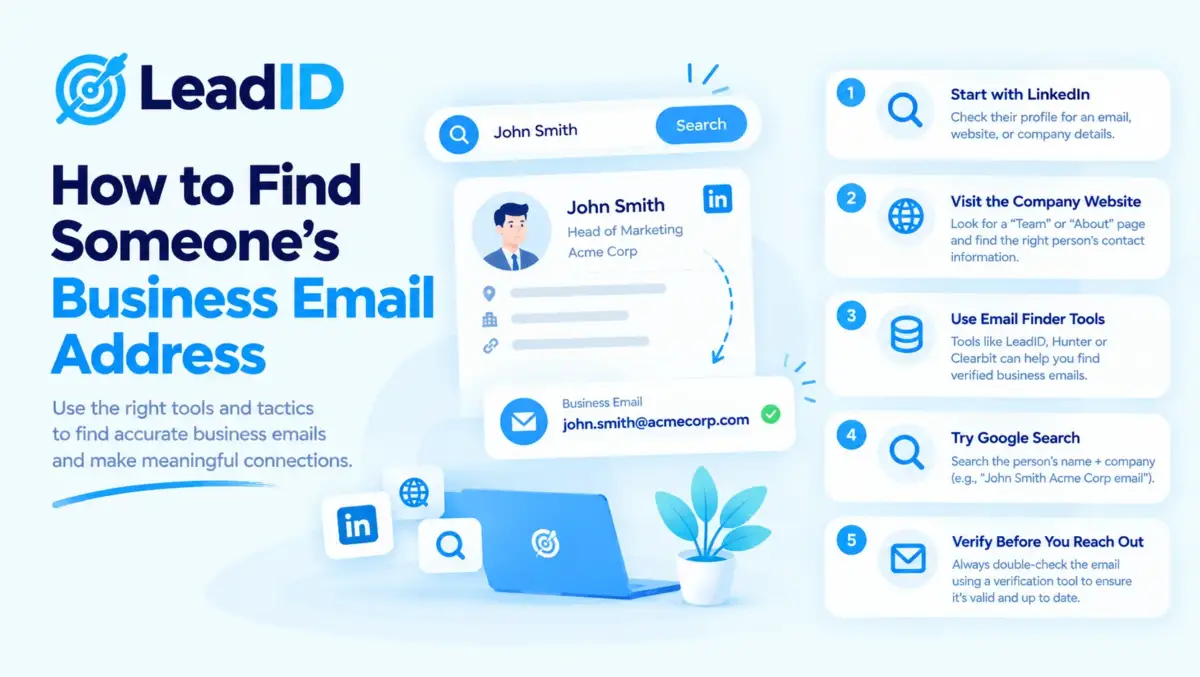
You found the person you want to reach. Great. But now you need their email address, and there is no obvious way to get it.
I have been doing this for years. Some emails take me 30 seconds. Others take 10 minutes. And some I cannot find at all. The trick is knowing which method to try first for your specific situation, so you don’t waste time clicking through tools that will never work for that contact.
Below are 9 ways to find an email address in 2026. Free methods first. Paid tools after. Each one has a time estimate, an accuracy number, and a cost, so you can pick the right one in seconds. All of this sits on top of a solid ideal customer profile, so the people you look up are worth the lookup in the first place.
Key Takeaways
9 Ways To Find An Email Address, Ranked By Speed And Accuracy
Here is the quick picture. Scan this first, then jump to the method that fits your situation.
Every address that comes back from a finder should pass a verification check before it ever sees a sender, because a single unverified batch is the fastest way to push hard bounce vs soft bounce rates past the 2 percent Gmail ceiling that triggers domain-level throttling on every program running off the same sending domain.
The manual methods above work for one-off research, but once you cross roughly 20 outreach emails per day, email finder tools automate what these steps do by hand, with built-in SMTP verification and bulk-list handling at a lower per-email cost than manual guess-and-verify.
| METHOD | TIME | ACCURACY | COST |
|---|---|---|---|
| 1. LinkedIn Contact Info | 30 seconds | 98% | Free |
| 2. Company Website | 2-5 minutes | 95% | Free |
| 3. Google Search Operators | 3-10 minutes | 90% | Free |
| 4. Guess The Pattern + Verify | 1-3 minutes | 60-75% | Free |
| 5. Email Finder Tools | 5 seconds | 72-85% | $34-$149/mo |
| 6. Chrome Extensions On LinkedIn | 10 seconds | 80-90% | Free-$65/mo |
| 7. Lead Search Engines | Batch (1000s) | 75-85% | $49-$119/user/mo |
| 8. Waterfall Enrichment | 3 seconds | 90-97% | $149-$495/mo |
| 9. Signal-Based Sourcing | Varies | 85-92% | $29-$185/mo |
Method 1: LinkedIn Contact Info
This is the fastest way to find a work email, when you are lucky. Many people put their email right into their LinkedIn Contact Info panel. First-degree connections see everything. Second and third-degree see only what the person made public.
Step 1: Open the person’s LinkedIn profile.
Step 2: Click “Contact info” at the top of the profile, right under their name.
Step 3: If the email is there, copy it. Done.
Executives often hide this field. If Contact Info is empty, skip to Method 2 or 6.
Method 2: Company Website Pages
Smaller companies hand you emails on a plate. Agencies, consulting firms, startups under 100 people, and most B2B services list team contact details right on the site.
Where to look (in this order):
- /team or /about pages
- /leadership or /people
- /press or /media (for comms contacts)
- /contact (sometimes lists department heads)
- /legal or /privacy (for the Data Protection Officer)
- Website footer (small companies drop founder emails here)
Technical companies often leak emails through GitHub profiles, documentation author bylines, and conference speaker pages. If your target is a developer, check there too.
Method 3: Google Search Operators
Google has already indexed millions of emails sitting in PDFs, press releases, academic papers, and conference programs. You just need to ask the right way. Try these searches in order:
site:company.com "@company.com": pulls every email on the company’s own site and reveals their format."firstname lastname" "@company.com": direct search for the person at that domain."firstname lastname" "email" "company": catches former employers and unexpected mentions.site:linkedin.com/in/ "job title" "@company.com": finds emails hidden in LinkedIn About sections.filetype:pdf "company name" "@": surfaces annual reports and investor decks with contact pages.
I usually start with the first one. Even if your target isn’t listed, you learn the company’s email pattern in 10 seconds, which sets up Method 4.
Method 4: Guess A Pattern And Verify It
Companies pick one email format at founding and almost never change it. If you know one person’s email at the company, you know everyone’s. Here is how most B2B domains break down:
| PATTERN (JANE DOE @ ACME.COM) | FREQUENCY | COMMON IN |
|---|---|---|
| [email protected] | ~55% | Mid-market and enterprise (50+ employees) |
| [email protected] | ~15% | Startups (under 30 employees) |
| [email protected] | ~10% | Legacy enterprise, financial services |
| [email protected] | ~8% | Mid-market SaaS and agencies |
| [email protected] | ~5% | European companies, especially DACH |
| [email protected] | ~3% | Nordic countries, academic |
| [email protected] | ~2% | Older internal systems, non-profits |
| Other formats | ~2% | Custom conventions, government |
Step 1: Find one known email at the company (Method 2 or 3).
Step 2: Spot the pattern. If you see “[email protected]”, your target “Jane Doe” is almost certainly “[email protected]”.
Step 3: Verify the guess with a free verifier like NeverBounce (10 free credits) or Hunter’s email verifier.
Method 5: Email Finder Tools
Type a name and company domain. Get an email in five seconds. That is what these tools do. They search a database of billions of verified addresses, then run SMTP checks to confirm the result.
My go-to picks:
- Hunter.io : $34/mo for 500 searches. Clean interface, trusted brand, generous free tier (25 searches/month).
- FindyMail : $49-$149/mo, pay-per-found pricing. You only pay for verified results, not failed lookups.
- Snov.io : $39-$189/mo. Includes a sending platform, so you can go from find to send in one tool.
- Anymailfinder : pay-per-found like FindyMail. Good if you want backup to a primary finder.
If you look up fewer than 50 emails per month, start with Hunter’s free plan. If you want strict budget control, pick FindyMail. If you want find-and-send in one place, Snov.io wins.
Method 6: Chrome Extensions On LinkedIn
If you live on LinkedIn, a Chrome extension turns every profile into a one-click email reveal. Install one of these, then click a button on any profile:
- Lusha : fastest reveal, generous free tier (5 contacts/month), $49.90/mo paid.
- Apollo : free tier with 100 export credits/month, strong database, built-in sequencing.
- Kaspr : GDPR-compliant European data (owned by Cognism), $65/mo paid.
- Hunter : pairs with the finder tool above, works on both LinkedIn and company pages.
For solo sellers prospecting on Sales Navigator, Lusha is the fastest. For teams, Apollo is the better all-in-one. For European targets, Kaspr is the compliance-safe pick.
Method 7: Lead Search Engines (For Bulk Lists)
Need 500 emails, not one? Switch to a lead search engine. You describe your ideal customer with filters (industry, company size, job title, location), and the tool returns thousands of matching contacts with email addresses included.
Best picks for 2026:
- Apollo : 275M contacts, $49-$119/user/mo. Free tier works for small lists.
- UpLead : $99/mo, 95% email guarantee with credit refunds on bounces.
- Cognism : enterprise ($12K+/year), best for EU prospecting with GDPR-compliant mobile numbers.
- ZoomInfo : enterprise ($15K+/year), deepest US contact and intent data.
Whichever you pick, run the exported list through a verifier like NeverBounce or ZeroBounce before sending. Expect to clean 15-25% of records as stale or catch-all.
Method 8: Waterfall Enrichment (Highest Accuracy)
Waterfall enrichment is the pro method. Instead of asking one provider, the tool checks 5 to 15 providers in sequence and returns the first match that passes a confidence threshold. Clay, FullEnrich, and LeadMagic are the leaders here.
Why it wins: every provider has a different coverage pattern. One is strong on US tech, another on EU manufacturing, a third on new executive hires. The waterfall catches what any single tool misses.
The trade-off is setup. Clay takes a RevOps engineer about three hours to configure the first table. After that, it runs itself.
Method 9: Signal-Based Sourcing (Time Your Lookup)
The best email is a fresh email. People who just changed jobs, closed funding, or shipped a product update are more open to outreach. Tools like UserGems, LeadMagic, and Clay signal workflows catch these moments and surface the contacts with verified emails attached.
The accuracy boost comes from recency. A newly promoted VP has a verified new email that most databases will not update for 60 to 90 days. For that window, you get near-perfect accuracy on an account that is actively buying. More on this in the full intent data guide.
Which Method Should You Actually Use?
Let me cut to the point. Here is what I would do in each situation.
If You Need One Named Target (A CEO, A VP, A Partner)
Start with LinkedIn Contact Info. If it’s blank, run two Google searches (site:company.com "@company.com" and "name" "@company.com"). Still nothing? Use the free tier of Lusha or Apollo on their LinkedIn profile.
Total time: under five minutes. Total cost: zero.
If You Need 10-50 People
Use an email finder with pay-per-found pricing. FindyMail or Anymailfinder work well. You only pay for the emails they actually find and verify.
Total time: 30-60 minutes. Total cost: $5-$25 one-time.
If You Need 500-5,000 Prospects (Full ICP List)
Use Apollo, Cognism, or UpLead with ICP filters. Export the list, then run it through NeverBounce or ZeroBounce to clean the 15-25% that are stale or catch-all.
Total time: 2-4 hours. Total cost: $100-$400.
If You Need Maximum Accuracy On Named Accounts
Use Clay or FullEnrich. The waterfall will cost you $0.03-$0.12 per verified email and hit 95%+ accuracy on your target list. Worth it when you’re reaching high-value accounts where one wrong email damages the deal.
Why You Must Verify Every Email Before Sending
Finding the email is half the job. Verifying it is the other half. Here is why that matters.
Every bounced email tells Gmail you don’t know what you’re doing. Three or four bounces in a row and your sender reputation drops. Reputation damage lowers your inbox placement for weeks, even on emails that would normally land in the primary inbox.
A verifier checks a few things before you send: does the mailbox exist, does the domain accept mail, is the address a known catch-all, and does it match a disposable email pattern. All in under a second per address.
How Verification Actually Works
A verifier opens an SMTP connection to the recipient’s mail server (SMTP is the protocol every email uses) and asks whether the mailbox exists. The server replies with a code. Most servers respond in one of six ways:
- Standard: accepts real mailboxes, rejects fake ones. Easiest to verify.
- Catch-all: accepts every address at the domain. Impossible to verify directly.
- Greylisting: temporary “try again later” rejection. Good verifiers retry.
- Tarpitting: deliberately slow responses to deter spam checks. Can trigger timeouts.
- SEG-protected: a security gateway (Proofpoint, Mimecast) accepts everything upfront, then filters later.
- No mail server: no MX record found. Email can’t possibly work.
What To Do About Catch-All Domains
A catch-all domain accepts any address. So even your fake guesses come back “valid”. Roughly 15-25% of B2B domains run this way, usually to prevent typo bounces.
Advanced verifiers (LeadMagic, NeverBounce) handle this by sending a probe to a known-fake address first. If that also returns “valid”, the server is catch-all and the real guess gets flagged as “risky” instead of “safe”.
My rule: on catch-all domains, send only to people you have a second data source for (a LinkedIn profile confirmation, a public bio mention, a mutual connection). Never cold-send to a pure guess on a catch-all.
Is It Legal To Find Someone’s Email Address?
Short answer: yes, for business emails, with rules.
United States (CAN-SPAM)
You can send cold B2B emails as long as you:
- Identify yourself and your company clearly
- Include a real physical mailing address
- Honor opt-outs within 10 business days
- Don’t use deceptive subject lines or From addresses
European Union And UK (GDPR, PECR)
B2B outreach to professional emails is allowed under “legitimate interest”. You don’t need upfront consent, but you must offer immediate opt-out and only use data from legitimate sources. Scraped lists and personal emails are out of bounds.
Personal Emails Are Different
Gmail, Yahoo, and Outlook.com addresses are personal data under GDPR and require explicit opt-in consent. Don’t cold-email personal addresses. Also, they have no pattern to guess and no directory to search, so you probably can’t find them anyway.
Common Mistakes To Avoid
- Sending without verifying. A guessed email that bounces hurts your reputation for a week.
- Trusting “valid” results on catch-all domains. Those domains say yes to everything.
- Chasing personal emails. No pattern, no directory, no legal basis. Walk away.
- Using data older than three months. Contact data decays 2-3% per month, so quarterly stale rate is 25%+.
- Picking the wrong tool for the scale. Clay for one CEO is overkill. Manual LinkedIn for 1,000 contacts is a nightmare.
- Forgetting the opt-out link. It only takes a sentence, and skipping it breaks CAN-SPAM.
Start Finding Email Addresses Right Now
Pick the method that fits your situation. Start free. Only pay for a tool when you clearly need the volume or the speed.
Then verify every email before you send. A clean list keeps your sender reputation healthy and the full published Gmail sending limits available to you. A dirty list burns the mailbox in a week.
FAQs
1- How do I find someone’s email address for free?
Check LinkedIn Contact Info first. If that’s empty, try Google with site:company.com "@company.com". Then check the company’s /team or /about page. About one in three business emails are already public and takeable in under five minutes.
2- What’s the most accurate way to find an email?
Waterfall enrichment through Clay or FullEnrich. These tools check 5-15 providers per contact and hit 95%+ accuracy. For a single lookup, LinkedIn Contact Info is 98% accurate when the field is visible.
3- How do email finder tools work?
You type a name and a company domain. The tool checks a database of billions of verified addresses, applies pattern matching where it has to guess, then runs an SMTP check to confirm. Takes about five seconds per lookup.
4- What is a catch-all email domain?
A catch-all domain is a mail server that accepts every address, even fake ones. About 15-25% of B2B domains work this way. Standard verification can’t tell real mailboxes from fake ones on catch-all, so even “valid” guesses can bounce.
5- Can I find someone’s personal Gmail address?
Not reliably. Personal email providers have no public directory, no email pattern to guess, and cold-emailing personal addresses isn’t legal under GDPR anyway. If you need a personal email, just ask the person or get a mutual intro.
6- Is it legal to find business email addresses?
Yes, in both the US (CAN-SPAM) and EU (GDPR legitimate interest), as long as the data source is legitimate, you identify yourself, and you honor opt-outs. Scraped lists and personal emails are out of bounds.
7- What’s email pattern guessing?
You find one known email at the company, spot the format (first.last@, flast@, etc.), then apply it to your target name. Accuracy is 60-75% depending on company size. Always verify before sending.
8- What’s the cheapest email finder tool?
For low volume, Hunter’s free plan (25 searches/month) and Apollo’s free tier (100 export credits/month) both work. For pay-only-for-what-you-find, FindyMail and Anymailfinder charge only for verified results.
9- How often does contact data go stale?
About 2-3% per month, which compounds to 25-30% per year. Job changes and company exits cause most of the churn. Re-verify your list monthly if you send daily, or at least quarterly for lower volume.
10- What’s the best Chrome extension to find emails on LinkedIn?
Lusha for the fastest one-click reveal. Apollo if you also want built-in sequencing. Kaspr for GDPR-compliant European data at a lower price. All three have usable free tiers.


Pingback: 15 Best Data Enrichment Tools for 2026 (Price, Coverage, Fit)
Pingback: How Many Emails Can You Send Before Spam? (2026 Real Numbers)
Pingback: Best Sales Prospecting Tools in 2026: 10 Picks Across Six Stack Roles
Pingback: Gmail Sending Limits In 2026: Every Official Number From Google
Pingback: 12 Best Email Finder Tools In 2027 (Honest Accuracy Numbers)
Pingback: Cold Email Outreach in 2026: Process, Tips, and Mistakes to Avoid